
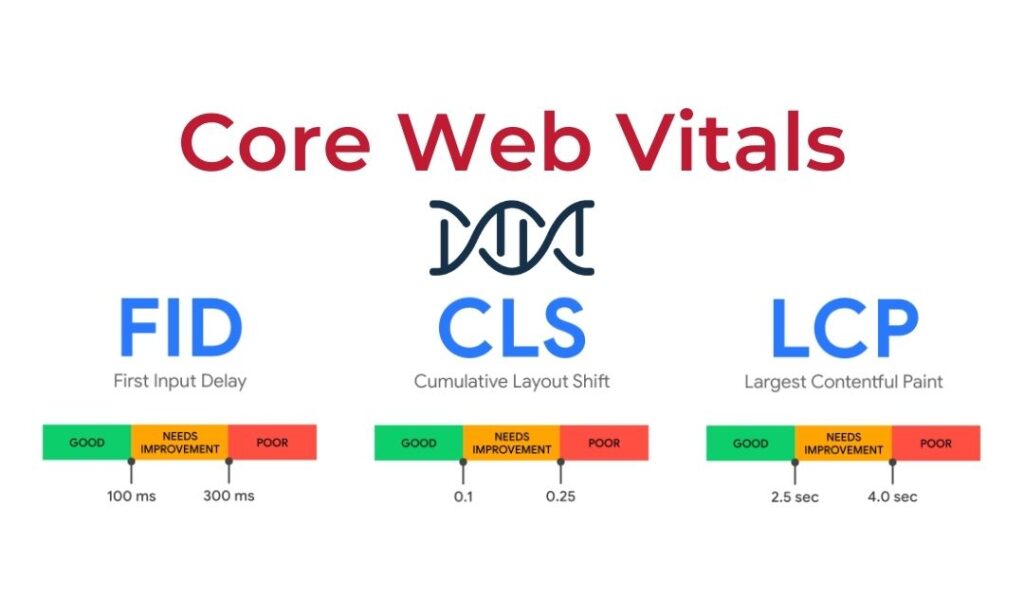
When Google speaks, you always have to open your eyes and ears. If Google talks about Core Web Vitals—essential web signals—if possible, even more so.
CWV : you can bet on it, if you have an online business (let alone if you deal with SEO…) this acronym has entered your life in the last few months .
Let ‘s take stock of Google’s Core Web Vitals : what they are, why they’re important, what elements you need to consider, and how to monitor them. Let’s start from the beginning , when Google announced in May 2020 that they would become crucial to page rankings starting in 2021 .
LOADING – Largest Contentful Paint (LCP)
INTERACTIVITY – First Input Delay (FID)
VISUAL STABILITY – Cumulative Layout Shift (CLS)
Why Core Web Vitals are Important
What are Core Web Vitals?
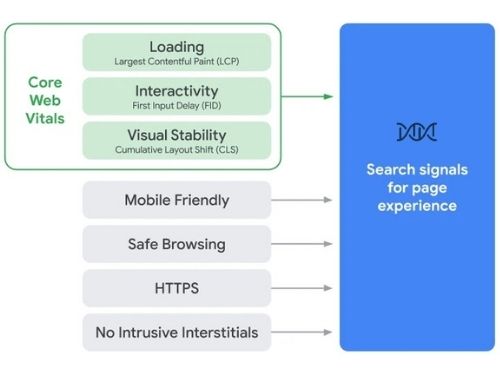 “Evaluating page experience for a better web” was the title of a rather short post in which Big G introduced Core Web Vitals.
And at the same time, it contributed to making this already hectic 2020 even more turbulent—especially for programmers and SEO specialists…
Google has essentially announced the introduction of new metrics that will influence the algorithm and help determine page ranking.
Does this mean that well-known metrics like whether a site is mobile-friendly, compliant with the HTTPS security protocol, or free of intrusive ads will disappear? Absolutely not.
Everything that already had meaning for Google will continue to have meaning , but it will be complemented by these new values that will need to be paid close attention to.
The user experience on the page is becoming increasingly central : the Core Web Vitals are in fact closely connected to the UX (user experience) and include 3 main elements :
- LOADING (loading speed)
- INTERACTIVITY (page interactivity)
- VISUAL STABILITY (visual loading stability)
We analyze them individually, so as to go more in depth with each of them.
LOADING – Largest Contentful Paint (LCP)
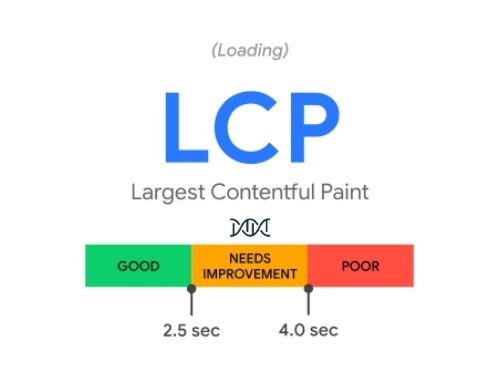 Google clarifies what this parameter does, namely “the time taken to display the largest element in the viewport from the moment the user requests the URL .”
This is the metric that measures loading performance , that is, the time interval between the start of loading and the complete rendering of the largest visible element within the screen when the site is opened.
This is usually an image or video , or a large block-level text element.
It goes without saying that the lower this value, the better the result will influence the page ranking .
INTERACTIVITY – First Input Delay (FID)
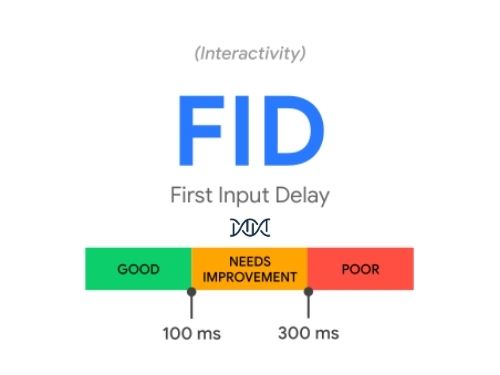
Here Google explains that it measures “the time between a user’s first interaction with your page (clicking a link, tapping a button, etc.) and when the browser actually responds to the interaction . This measurement is derived from whatever interactive element the user clicked on first.”
Please note that Google only considers the first input delay because it believes that this first response will greatly influence the overall impression of the quality/reliability of navigation .
VISUAL STABILITY – Cumulative Layout Shift (CLS)
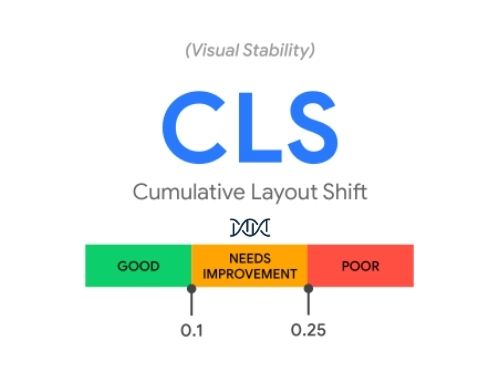 You enter a site with a specific goal in mind . You need to buy something, search for news, sign up for a newsletter: it doesn’t matter. The site starts loading, and you immediately see what you’re looking for .
Click !
And yet, in the meantime, that button, while the page was loading, moved . Or maybe it even disappeared.
This is what the CLS introduced by Google measures : the variation in the layout of the page during the loading phase .
Why Core Web Vitals are Important
 In short, the music has changed. From now on, doing SEO, or more simply positioning yourself on Google without considering Core Web Vitals, will be like going fishing with your bare hands .
But don’t worry. For once, Google has announced the news ahead of time .
In short, it won’t happen overnight that you check the performance of your site’s pages and see them plummet in the rankings , as sometimes happens after major updates to Big G’s algorithm.
Poi perché i fattori cui prestare attenzione sono già noti fin dal principio e dunque si tratterà “solo” di ottimizzare le proprie pagine, ma avendo già chiara quale sia la direzione da percorrere.
Una strada – bisogna dirlo – non particolarmente accidentata, specie se percorsa al sicuro magari guidati da professionisti del settore.
In sostanza, Google mette sempre più al centro la user experience, e questa neppure è una novità ma invece un’ulteriore conferma del percorso intrapreso.
Semplificare il design, riflettere sulla funzionalità degli elementi presenti nelle pagine, tagliare ciò che può essere superfluo per favorire la velocità del sito.
Allontanare dalla parte alta gli elementi pubblicitari più impegnativi per il caricamento della pagina sicuramente rende la navigazione più fluida (e incide meno sul fattore LCP). Poi, preoccuparsi di inserire sempre le dimensioni precise delle foto, dei video (anche embeddati) può fare ulteriormente la differenza.
C’è da aggiornare l’elenco degli elementi cui prestare attenzione per affidarsi a un sito che sappia soddisfare tanto le aspettative della “macchina” di Google che quelle degli utenti, in carne ed ossa, che lo navigano.
Le due cose, come stiamo vedendo, sono sempre più coincidenti.
Quali elementi sono da considerare per i Core Web Vitals?
 Dipende, ovviamente, da parametro preso in considerazione.
Nel caso del Largest Contentful Paint (LCP), gli elementi oggetto di valutazione sono i seguenti:
- elementi di tipo immagini <img>
- elementi di tipo immagini <image> dentro a elementi di tipo <svg>
- elementi di tipo video <video>
- elementi di immagini in background caricati attraverso la mitica funzione url() che si usano dentro i CSS
- Un elemento di blocco (Block-level) che contiene testo o altri elementi
Diverso il discorso quando ci si riferisce ai First Input Delay (FID).
In questo caso l’attenzione è rivolta alla prima interazione dell’utente con la pagina.
Qualche esempio di interazione?
- Click su un link
- Touch da mobile su un bottone
- Qualsiasi listener JavaScript
Lo scorrimento e lo zoom invece sono azioni continue e non vengono prese in considerazione.
Veniamo allora al terzo elemento, il Cumulative Layout Shift (CLS).
Qui il focus è sullo spostamento degli elementi visibili e i cambiamenti di layout che arrivano all’improvviso e si verificano durante l’intera durata della visita della pagina, causando uno shift dopo il caricamento dell’area del sito dovuto al ridimensionamento.
Leggi anche: Gli elementi visivi per un content marketing vincente
Come monitorare i Core Web Vitals
 Una volta capito cosa sono i CWV, non vorrai mica fermarti alla teoria, vero?
Sul web, tutto può (e deve) essere misurato in modo da poter prendere decisioni consapevoli nel continuo processo di ottimizzazione delle nostre risorse digitali.
Insomma, non resta che capire come tracciare questi Core Web Vitals quindi.
Ottime notizie: ci ha pensato Google stesso offrendo una serie di tool indispensabili allo scopo.
Il più importante motore di ricerca al mondo già da anni ci fornisce moltissimi strumenti utili a misurare le prestazioni dei nostri siti e generare dei rapporti a riguardo. Ritenendo che i CWV siano fondamentali per migliorare l’esperienza di chi naviga il web, Google si è impegnato a far emergere queste metriche in tutti i principali strumenti di misurazione e reportistica.
Potrai trovare elementi utili ad analizzare le tue performance su tutti e 3 i parametri principali dei Core Web Vitals tanto su Search Console quanto su PageSpeed Insights e sull’estensione Web Vitals, per citare i principali.
PageSpeed Insights è forse il migliore tra tutti gli strumenti disponibili offrendo non solo una gran quantità di dati sui CWV ma anche una serie di utili metriche principalmente con riferimento al miglioramento delle pagine con errori, con un occhio di riguardo per tutto ciò che influenza la velocità della pagina e il download delle risorse contenute.
L’approccio ideale è quello di mixare questi dati (Iab data, quindi dati prestazionali ipotetici e non rappresentativi di ciò che vedono i veri utenti del sito e delle pagine) a quelli del report Web Vitals della Google Search Console, basati “sul campo”, sul monitoraggio di utenti reali.
Ulteriori informazioni rispetto ai CWV sono disponibili inoltre anche su Chrome DevTools e Lighthouse, dove solo la metrica relativa al parametro FID verrà successivamente implementata.
Ma quali sono gli standard di riferimento cui fare attenzione per ognuna delle 3 metriche principali dei CWV?
Intanto le prestazioni vengono raggruppate in 3 categorie di risultati:
- Buono
- Miglioramenti necessari
- Fallito
Per quanto riguarda il parametro relativo alla velocità di caricamento (LCP), il risultato vale la promozione se si ottiene il caricamento in meno di 2,5 secondi. Fino a 4 secondi si finisce nel “purgatorio”, oltre… arriva la penalizzazione.
Nel caso del (FID) gli utenti dovrebbero essere in grado di interagire con la pagina entro 100 millisecondi, oltre i 300 millisecondi invece il test è considerato fallito.
The calculation of the CLS is rather complicated and is expressed as the product of two values , the impact component and the distance component using this formula :
Layout shift score = impact component * distance component
According to Google, the resulting product must have a maximum score of 0.1 to fall into the “good” category and no more than 0.25 to avoid failing the test.
WANT TO LEARN MORE ABOUT CWV OR GET PROFESSIONAL SUPPORT TO OPTIMIZING YOUR SITE’S PAGES AND REACHING THE GOOGLE RANKINGS WITH AN EXTRAORDINARY UX? LET US TAKE CARE OF IT!